Invoice Bot
Your team takes a photo of each vendor invoice, and after a manager taps approve, the bot enters it into your system, so nobody has to type it in.
It runs today at a liquor retailer with seven stores and a warehouse, where managers approve 98 of every 100 invoices without fixing a single line. Nobody there had to learn a new tool, because the warehouse team was already posting invoice photos in their team chat. I'm Raj Lakhani, and I built it in Hermosa Beach.
Send me a photo of your worst invoice1. Someone snaps the invoice
When a delivery comes in, whoever signs for it takes a photo of the invoice and posts it in the team chat, the same way they would text it to a manager.
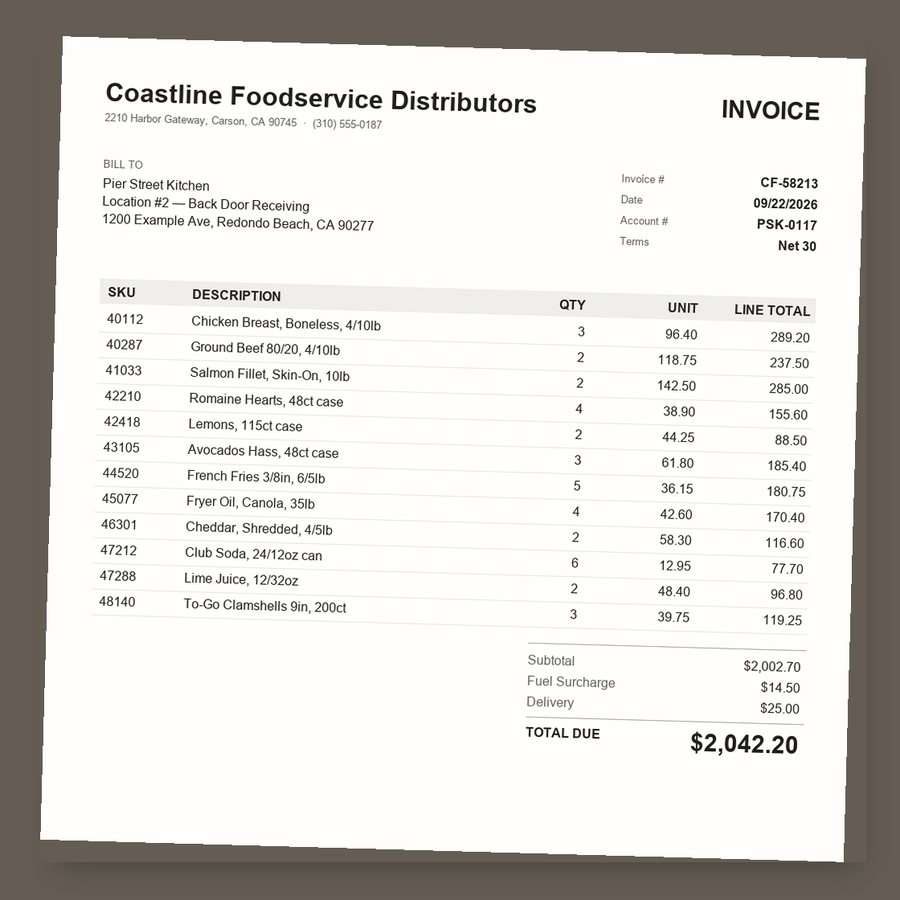
2. The bot reads every line
AI reads the photo, and about 20 seconds later the bot posts back every item, quantity, price and fee it found. It also checks that the lines and fees add up to the invoice total, and it flags any gap before anyone approves.
This is the real bot's reading of the photo above, word for word, and every line matches the paper. The 👍 and 👎 under it are the two buttons a manager taps.
3. A manager checks it and taps 👍
Nothing goes into your system until a manager approves it. If a line is wrong, they reply in plain words and the bot fixes that line, so a short delivery takes one sentence to correct.
That reply and the bot's answer are real output too.
4. The purchase order is created
When the manager taps 👍, the bot enters the invoice into the store's inventory system, called Lightspeed, as a purchase order, which is the store's record of what it bought. Then it marks the invoice approved in the chat, and the back office no longer types these in.
What if something is off?
- If the photo is too blurry to read, the bot asks for a clearer photo instead of guessing.
- If the lines and fees don't add up to the invoice total, the bot flags the gap before anyone approves.
- If the same invoice gets posted twice, the bot catches it and asks before entering it again.
- If a manager taps 👎, nothing is entered, and the invoice goes back to your office to be entered the usual way.
What it takes for you
At the liquor retailer it runs in Discord, a free team chat app, because that is where their warehouse team already posted photos. For you, it would go where your managers already talk, and it would enter each approved invoice into the system you already use, such as QuickBooks or Restaurant365, as a bill. Connecting those two pieces is the setup work, and nobody on your team has to learn a new app.
Try it on your own invoice
Send me a photo of one of your invoices, the messier the better, and I'll send back exactly what the bot reads from it. It costs you nothing, and you'll see in a few minutes whether it can handle your paperwork. I use your photo only to show you the result and delete it afterward, and a produce or supply invoice works fine if you'd rather not share your main vendor's prices. References are available once we talk.
Email me a photoYou can also text it to 949-232-5553.